NFV performance factors
The Red Hat OpenStack Services on OpenShift (RHOSO) network functions virtualization (NFV) solution exploits the Kernel-based Virtual Machine (KVM) hypervisor to match or exceed the performance of physical implementations, especially with regard to throughput, latency, and jitter.
You configure RHOSO Compute nodes to enforce resource partitioning and fine tuning to achieve line rate performance for the guest virtual network functions (VNFs).
You can enable high-performance packet switching between physical NICs and virtual machines by using data plane development kit (DPDK) accelerated virtual machines. Open vSwitch (OVS) embeds support for Data Plane Development Kit (DPDK) and includes support for vhost-user multiqueue, allowing scalable performance. OVS-DPDK provides line-rate performance for guest VNFs.
Single root I/O virtualization (SR-IOV) networking provides enhanced performance, including improved throughput for specific networks and virtual machines.
Other important features for performance tuning include huge pages, NUMA alignment, host isolation, and CPU pinning. VNF flavors require huge pages and emulator thread isolation for better performance. Host isolation and CPU pinning improve NFV performance and prevent spurious packet loss.
CPU and NUMA node allocation for NFV performance
Previously, all memory on x86 systems was equally accessible to all CPUs in the system. This resulted in memory access times that were the same regardless of which CPU in the system was performing the operation and was referred to as Uniform Memory Access (UMA).
In Non-Uniform Memory Access (NUMA), system memory is divided into zones called nodes, which are allocated to particular CPUs or sockets. Access to memory that is local to a CPU is faster than memory connected to remote CPUs on that system. Normally, each socket on a NUMA system has a local memory node whose contents can be accessed faster than the memory in the node local to another CPU or the memory on a bus shared by all CPUs.
Similarly, physical NICs are placed in PCI slots on the Compute node hardware. These slots connect to specific CPU sockets that are associated with a particular NUMA node. For optimum performance, connect your data path NICs to the same NUMA nodes in your CPU configuration (SR-IOV or OVS-DPDK).
The performance impact of NUMA misses are significant, generally starting at a 10% performance hit or higher. Each CPU socket can have multiple CPU cores which are treated as individual CPUs for virtualization purposes.
NUMA node layout example
A two-node system can demonstrate a NUMA topology and the way CPU cores and memory pages are made available.
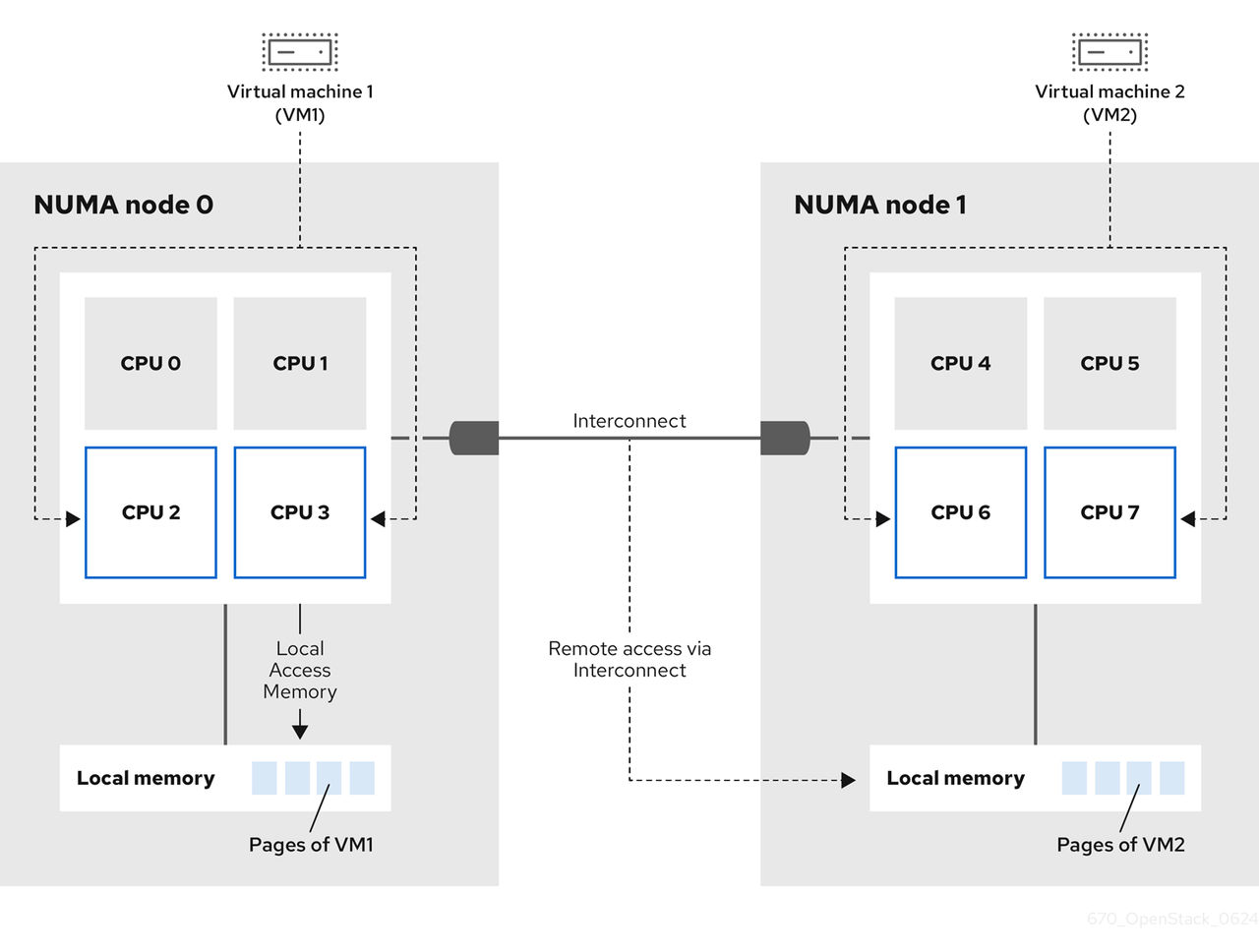
Remote memory available via Interconnect is accessed only if VM1 from NUMA node 0 has a CPU core in NUMA node 1. In this case, the memory of NUMA node 1 acts as local for the third CPU core of VM1 (for example, if VM1 is allocated with CPU 4 in the diagram above), but at the same time, it acts as remote memory for the other CPU cores of the same VM.
NUMA-aware instance placement for optimal performance
You can configure an OpenStack environment to use NUMA topology awareness on systems with a NUMA architecture.
When running a guest operating system in a virtual machine (VM) there are two NUMA topologies involved:
- NUMA topology of the physical hardware of the host
- NUMA topology of the virtual hardware exposed to the guest operating system
You can optimize the performance of guest operating systems by aligning the virtual hardware with the physical hardware NUMA topology.

'%20d='M201.5%20305.5c-13.8%200-24.9-11.1-24.9-24.6%200-13.8%2011.1-24.9%2024.9-24.9%2013.6%200%2024.6%2011.1%2024.6%2024.9%200%2013.6-11.1%2024.6-24.6%2024.6zM504%20256c0%20137-111%20248-248%20248S8%20393%208%20256%20119%208%20256%208s248%20111%20248%20248zm-132.3-41.2c-9.4%200-17.7%203.9-23.8%2010-22.4-15.5-52.6-25.5-86.1-26.6l17.4-78.3%2055.4%2012.5c0%2013.6%2011.1%2024.6%2024.6%2024.6%2013.8%200%2024.9-11.3%2024.9-24.9s-11.1-24.9-24.9-24.9c-9.7%200-18%205.8-22.1%2013.8l-61.2-13.6c-3-.8-6.1%201.4-6.9%204.4l-19.1%2086.4c-33.2%201.4-63.1%2011.3-85.5%2026.8-6.1-6.4-14.7-10.2-24.1-10.2-34.9%200-46.3%2046.9-14.4%2062.8-1.1%205-1.7%2010.2-1.7%2015.5%200%2052.6%2059.2%2095.2%20132%2095.2%2073.1%200%20132.3-42.6%20132.3-95.2%200-5.3-.6-10.8-1.9-15.8%2031.3-16%2019.8-62.5-14.9-62.5zM302.8%20331c-18.2%2018.2-76.1%2017.9-93.6%200-2.2-2.2-6.1-2.2-8.3%200-2.5%202.5-2.5%206.4%200%208.6%2022.8%2022.8%2087.3%2022.8%20110.2%200%202.5-2.2%202.5-6.1%200-8.6-2.2-2.2-6.1-2.2-8.3%200zm7.7-75c-13.6%200-24.6%2011.1-24.6%2024.9%200%2013.6%2011.1%2024.6%2024.6%2024.6%2013.8%200%2024.9-11.1%2024.9-24.6%200-13.8-11-24.9-24.9-24.9z'/%3e%3c/svg%3e)