OpenStack networking overview
The Networking service (neutron) provides SDN for RHOSO, managing VM traffic and core services including routing, segmentation, DHCP, metadata, and firewall management.
Network management
The Networking service (neutron) enables you to customize data plane networks, manage project networks, configure QoS policies, and secure network traffic.
You can do the following tasks:
- Customize the networks used in your data plane.
In RHOSO, the network configuration applied by default to the data plane nodes is the single NIC VLANs configuration. However, you can modify the network configuration that the OpenStack Operator applies for each data plane node set in your RHOSO environment.
- Provide connectivity to VM instances within a project.
Project networks primarily enable general (non-privileged) projects to manage networks without involving administrators. These networks are entirely virtual and require virtual routers to interact with other project networks and external networks such as the Internet. Project networks also usually provide DHCP and metadata services to VM (virtual machine) instances. RHOSO supports the following project network types: flat, VLAN, and GENEVE.
- Set ingress and egress limits for traffic on VM instances.
You can offer varying service levels for instances by using quality of service (QoS) policies to apply rate limits to egress and ingress traffic. You can apply QoS policies to individual ports. You can also apply QoS policies to a project network, where ports with no specific policy attached inherit the policy.
- Control which projects can attach instances to a shared network.
Using role-based access control (RBAC) policies in the RHOSO Networking service, cloud administrators can remove the ability for some projects to create networks and can instead allow them to attach to pre-existing networks that correspond to their project.
- Secure your network.
Security groups and the Firewall as a Service (FWaaS) feature let you control network traffic to and from virtual machine instances. Security groups control traffic at the virtual machine instance port. Firewall rules control traffic at the network or router port level.
Security groups use a default deny policy and only contain rules that allow specific traffic. Each port can reference one or more security groups in an additive fashion. ML2/OVN uses the Open vSwitch firewall driver to translate security group rules to a configuration.
By default, security groups are stateful. In ML2/OVN deployments, you can also create stateless security groups. A stateless security group can provide significant performance benefits. Unlike stateful security groups, stateless security groups do not automatically allow returning traffic, so you must create a complimentary security group rule to allow the return of related traffic.
Combining stateful security groups with FWaaS does not function as expected. To avoid this limitation, use stateless security groups when implementing FWaaS to ensure your layered defense operates correctly.
- Mirror port traffic
With the Tap-as-a-Service feature, you can use port mirroring to monitor traffic for security and compliance, performance analysis, troubleshooting, auditing, and lawful surveillance on traffic to and from ports in your Red Hat OpenStack on OpenShift (RHOSO) environment.
Networking service components
The Red Hat OpenStack Services on OpenShift (RHOSO) Networking service (neutron) includes the API server, Modular Layer 2 (ML2) plugin and agents, a messaging queue, and other components.
- API server
The RHOSO networking API includes support for Layer 2 networking and IP Address Management (IPAM), and an extension for a Layer 3 router construct that enables routing between Layer 2 networks and gateways to external networks. RHOSO networking includes a growing list of plugins that enable interoperability with various commercial and open source network technologies, including routers, switches, virtual switches and software-defined networking (SDN) controllers.
- Modular Layer 2 (ML2) plugin and agents
ML2 plugs and unplugs ports, creates networks or subnets, and provides IP addressing.
- Messaging queue
Accepts and routes RPC requests between RHOSO services to complete API operations.
Modular Layer 2 (ML2) networking plugin manager
Modular Layer 2 (ML2) is the core networking plugin for RHOSO, enabling concurrent operation of multiple network technologies through mechanism drivers.
The ML2 framework distinguishes between the two kinds of drivers that can be configured:
- Type drivers
-
Define how an RHOSO network is technically realized.
Each available network type is managed by an ML2 type driver, and they maintain any required type-specific network state. Validating the type-specific information for provider networks, type drivers are responsible for the allocation of a free segment in project networks. Examples of type drivers are GENEVE, VLAN, and flat networks.
- Mechanism drivers
-
Define the mechanism to access an RHOSO network of a certain type.
The mechanism driver takes the information established by the type driver and applies it to the networking mechanisms that have been enabled. RHOSO uses the OVN mechanism driver.
Mechanism drivers can employ L2 agents, and by using RPC interact directly with external devices or controllers. You can use multiple mechanism and type drivers simultaneously to access different ports of the same virtual network.
ML2 network types
You can operate multiple network segments at the same time. Modular Layer 2 (ML2) supports the use and interconnection of multiple network segments. You don’t have to bind a port to a network segment because ML2 binds ports to segments with connectivity.
Depending on the mechanism driver, ML2 supports the following network segment types:
- Flat
- VLAN
- GENEVE tunnels
- Flat
- All virtual machine (VM) instances reside on the same network, which can also be shared with the hosts. No VLAN tagging or other network separation occurs.
- VLAN
-
With RHOSO networking users can create multiple provider or project networks by using VLAN IDs (802.1Q tagged) that correspond to VLANs present in the physical network. This allows instances to communicate with each other across the environment. They can also communicate with dedicated servers, firewalls, load balancers and other network infrastructure on the same Layer 2 VLAN.
You can use VLANs to segment network traffic for computers running on the same switch. This means that you can logically divide your switch by configuring the ports to be members of different networks. They serve as mini-LANs that you can use to separate traffic for security reasons.
For example, if your switch has 24 ports in total, you can assign ports 1-6 to VLAN200, and ports 7-18 to VLAN201. As a result, computers connected to VLAN200 are completely separate from those on VLAN201; they cannot communicate directly, and if they wanted to, the traffic must pass through a router as if they were two separate physical switches. Firewalls can also be useful for governing which VLANs can communicate with each other.
- GENEVE tunnels
- Generic Network Virtualization Encapsulation (GENEVE) recognizes and accommodates changing capabilities and needs of different devices in network virtualization. It provides a framework for tunneling rather than being prescriptive about the entire system. GENEVE defines the content of the metadata flexibly that is added during encapsulation and tries to adapt to various virtualization scenarios. It uses UDP as its transport protocol and is dynamic in size by using extensible option headers. GENEVE supports unicast, multicast, and broadcast. The GENEVE type driver is compatible with the ML2/OVN mechanism driver.
Networking service extension drivers
The Networking service supports extension drivers that add new API features and vendor-specific functionality such as QoS and port security.
Applications can programmatically list available extensions by performing a GET on the /extensions URI. Note that this is a versioned request; that is, an extension available in one API version might not be available in another.
The ML2 plugin also supports extension drivers that allows other pluggable drivers to extend the core resources implemented in the ML2 plugin for network objects. Examples of extension drivers include support for QoS, port security, and so on.
Required data center networks
Red Hat OpenStack Services on OpenShift (RHOSO) requires a standard set of physical data center networks to isolate different types of network traffic and ensure reliable service communication.
- Control plane network
- Used by the OpenStack Operator for Ansible SSH access to deploy and connect to the data plane nodes from the Red Hat OpenShift Container Platform (RHOCP) environment. This network is also used by data plane nodes for live migration of instances.
- Designate network
- Used internally by the RHOSO DNS service (designate) to manage the DNS servers. For more information, see DNS service dedicated networks in Extend.
- Designateext network
- Used to provide external access to the DNS service resolver and the DNS servers.
- External network
-
An optional network that is used when required for your environment. For example, you might create an external network for any of the following purposes:
- To provide virtual machine instances with Internet access.
- To create flat provider networks that are separate from the control plane.
- To configure VLAN provider networks on a separate bridge from the control plane.
- To provide access to virtual machine instances with floating IPs on a network other than the control plane network.
Note When an external network is used for workloads, an OVN gateway is required in some use cases. For more information, see on use cases and available options, see Configure a control plane OVN gateway with a dedicated NIC in Configure.
- Internal API network
- Used for internal communication between RHOSO components.
- Octavia network
- Used to connect Load-balancing service (octavia) controllers running in the control plane. For more information, see Octavia network in Extend.
- Storage network
- Used for block storage, RBD, NFS, FC, and iSCSI.
- Storage Management network
-
An optional network that is used by storage components. For example, Red Hat Ceph Storage uses the Storage Management network in a hyperconverged infrastructure (HCI) environment as the
cluster_networkto replicate data.Note For more information about Red Hat Ceph Storage network configuration, see "Ceph network configuration" in the Red Hat Ceph Storage Configuration Guide:
- Red Hat Ceph Storage 7 Configuration Guide
- Red Hat Ceph Storage 8 Configuration Guide
- Red Hat Ceph Storage 9 Configuring > Ceph network configuration
- Tenant (project) network
- Used for data communication between virtual machine instances within the cloud deployment.
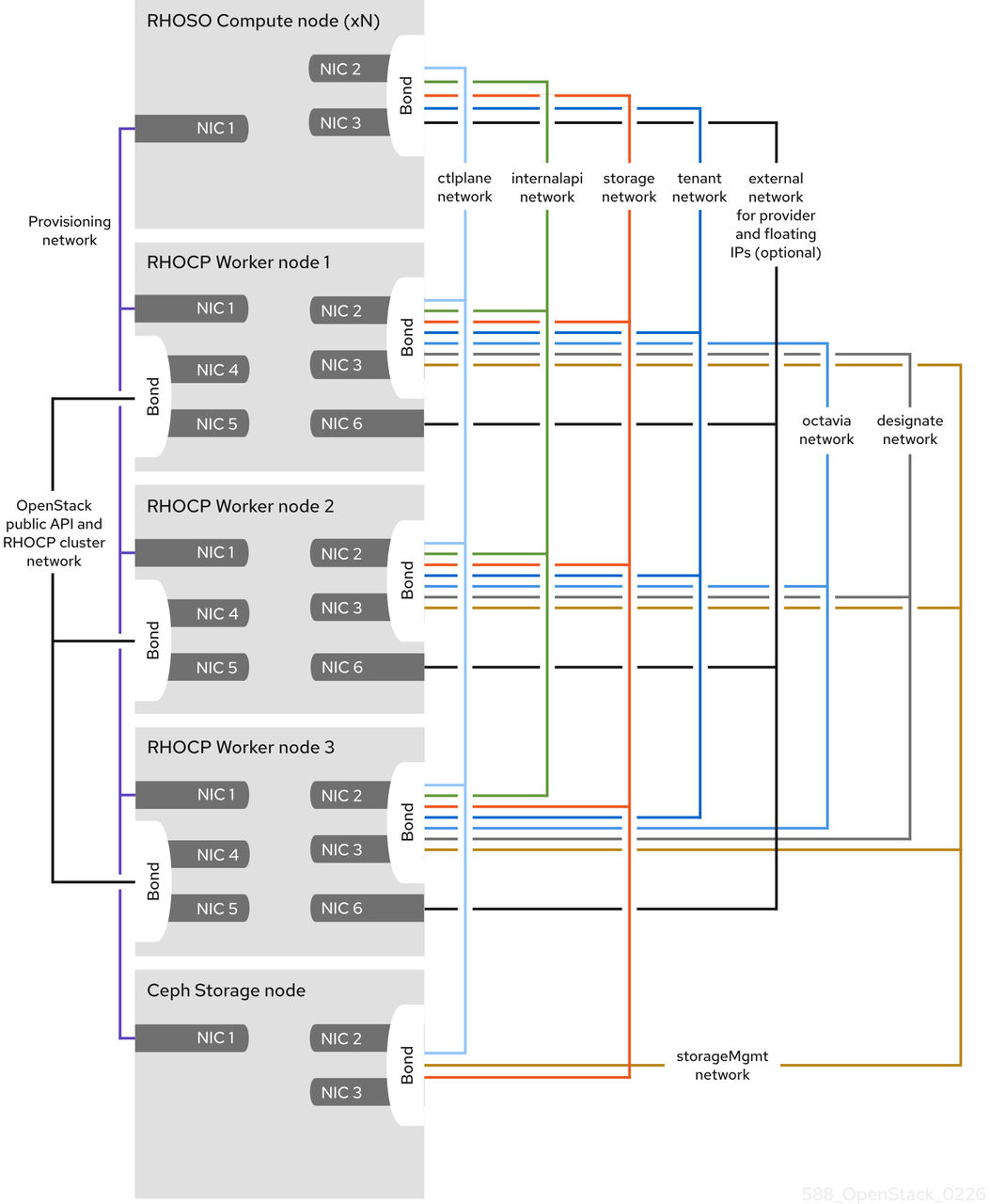
The following table details the default networks used in a RHOSO deployment.
| Network name | CIDR | NetConfig allocation range |
MetalLBIPAddressPool range |
net-attach-def IPAM range |
RHOCP workernncp range |
|---|---|---|---|---|---|
|
|
192.168.122.0/24 |
192.168.122.100 - 192.168.122.250 |
192.168.122.80 - 192.168.122.90 |
192.168.122.30 - 192.168.122.70 |
192.168.122.10 - 192.168.122.20 |
|
|
172.26.0.0/24 |
n/a |
n/a |
172.26.0.30 - 172.26.0.70 |
172.26.0.10 - 172.26.0.20 |
|
|
172.34.0.0/24 |
n/a |
172.34.0.80 - 172.34.0.120 |
172.34.0.30 - 172.34.0.70 |
172.34.0.10 - 172.34.0.20 |
|
|
10.0.0.0/24 |
10.0.0.100 - 10.0.0.250 |
n/a |
n/a |
n/a |
|
|
172.17.0.0/24 |
172.17.0.100 - 172.17.0.250 |
172.17.0.80 - 172.17.0.90 |
172.17.0.30 - 172.17.0.70 |
172.17.0.10 - 172.17.0.20 |
|
|
172.23.0.0/24 |
n/a |
n/a |
172.23.0.30 - 172.23.0.70 |
n/a |
|
|
172.18.0.0/24 |
172.18.0.100 - 172.18.0.250 |
n/a |
172.18.0.30 - 172.18.0.70 |
172.18.0.10 - 172.18.0.20 |
|
|
172.20.0.0/24 |
172.20.0.100 - 172.20.0.250 |
n/a |
172.20.0.30 - 172.20.0.70 |
172.20.0.10 - 172.20.0.20 |
|
|
172.19.0.0/24 |
172.19.0.100 - 172.19.0.250 |
n/a |
172.19.0.30 - 172.19.0.70 |
172.19.0.10 - 172.19.0.20 |

'%20d='M201.5%20305.5c-13.8%200-24.9-11.1-24.9-24.6%200-13.8%2011.1-24.9%2024.9-24.9%2013.6%200%2024.6%2011.1%2024.6%2024.9%200%2013.6-11.1%2024.6-24.6%2024.6zM504%20256c0%20137-111%20248-248%20248S8%20393%208%20256%20119%208%20256%208s248%20111%20248%20248zm-132.3-41.2c-9.4%200-17.7%203.9-23.8%2010-22.4-15.5-52.6-25.5-86.1-26.6l17.4-78.3%2055.4%2012.5c0%2013.6%2011.1%2024.6%2024.6%2024.6%2013.8%200%2024.9-11.3%2024.9-24.9s-11.1-24.9-24.9-24.9c-9.7%200-18%205.8-22.1%2013.8l-61.2-13.6c-3-.8-6.1%201.4-6.9%204.4l-19.1%2086.4c-33.2%201.4-63.1%2011.3-85.5%2026.8-6.1-6.4-14.7-10.2-24.1-10.2-34.9%200-46.3%2046.9-14.4%2062.8-1.1%205-1.7%2010.2-1.7%2015.5%200%2052.6%2059.2%2095.2%20132%2095.2%2073.1%200%20132.3-42.6%20132.3-95.2%200-5.3-.6-10.8-1.9-15.8%2031.3-16%2019.8-62.5-14.9-62.5zM302.8%20331c-18.2%2018.2-76.1%2017.9-93.6%200-2.2-2.2-6.1-2.2-8.3%200-2.5%202.5-2.5%206.4%200%208.6%2022.8%2022.8%2087.3%2022.8%20110.2%200%202.5-2.2%202.5-6.1%200-8.6-2.2-2.2-6.1-2.2-8.3%200zm7.7-75c-13.6%200-24.6%2011.1-24.6%2024.9%200%2013.6%2011.1%2024.6%2024.6%2024.6%2013.8%200%2024.9-11.1%2024.9-24.6%200-13.8-11-24.9-24.9-24.9z'/%3e%3c/svg%3e)