Troubleshoot volume backups
You can diagnose many issues by verifying that the Block Storage services are running correctly and then by examining the log files for error messages.
Backup troubleshooting tips
The Block Storage backup service performs static checks on backup requests and notifies you immediately when a check fails.
The service checks for the following conditions:
- Check for an invalid volume reference (
missing). - Check if the volume is
in-useor attached to an instance. Thein-usecase requires you to use the--forceoption to perform a backup.When you use the
--forcevolume backup option, you create a crash-consistent, but not an application-consistent, backup because the volume is not quiesced before performing the backup. Therefore, the data is intact but the backup does not have an awareness of which applications were running when the backup was performed.
When these checks succeed: the Block Storage backup service accepts the request to backup this volume, the CLI backup command returns immediately, and the volume is backed up in the background.
Therefore the CLI backup command returns even if the backup fails. You can use the openstack volume backup list command to verify that the volume backup is successful, when the Status of the backup entry is available.
If a backup fails, examine the Block Storage backup service log file for error messages to discover the cause.
Examine the backup service log
When a backup or restore does not succeed, you can examine the Block Storage backup service log file for error messages that can help you to determine the reason.
Procedure
This log file is located in the following path: /var/log/containers/cinder/cinder-backup.log.
Volume backup workflow
Review the volume backup workflow when users request backups through the Block Storage service (cinder) API.
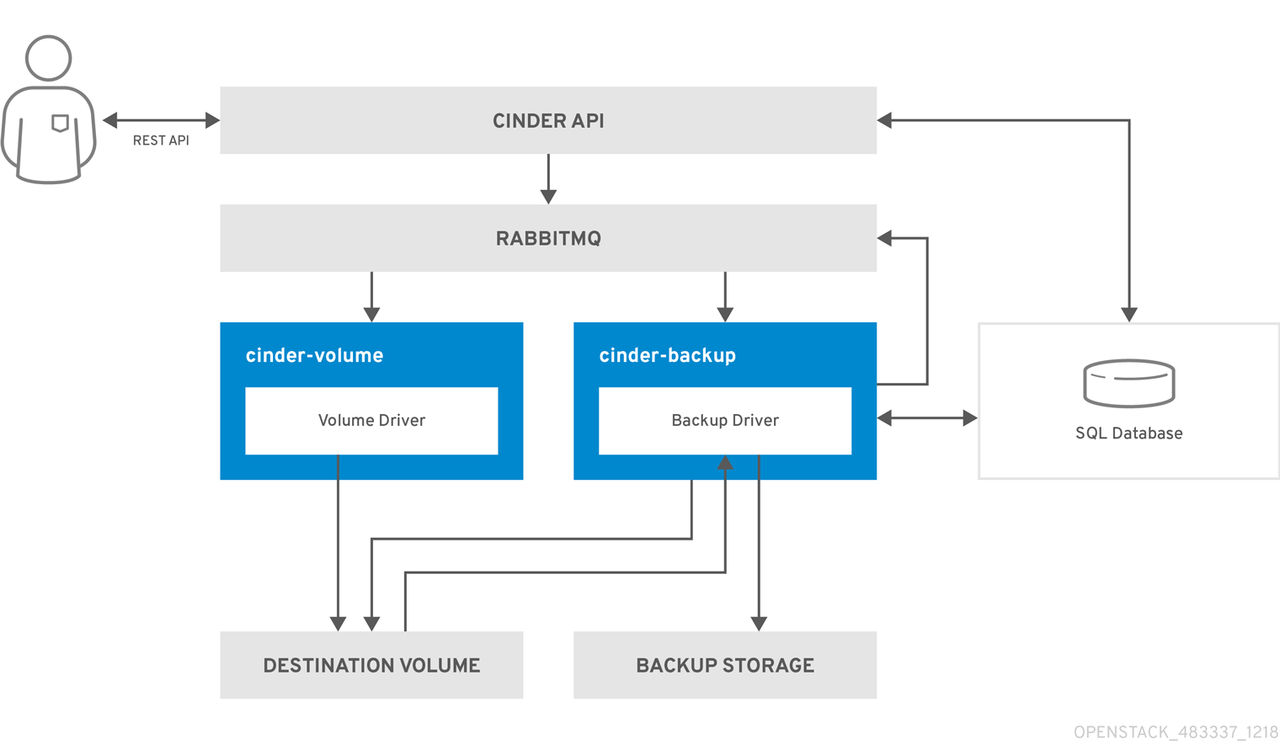
- The user issues a request to the cinder API, which is a REST API, to back up a Block Storage volume.
- The cinder API receives the request from HAProxy and validates the request, the user credentials, and other information.
- The cinder API creates the backup record in the SQL database.
- The cinder API makes an RPC call to the
cinder-scheduler. - The
cinder-schedulermakes an asynchronous RPC call to thecinder-backupservice via AMQP to back up the volume. - The cinder API returns the current backup record, with an ID, to the API caller.
- An RPC create message arrives on one of the backup services.
- The
cinder-backupservice performs a synchronous RPC call toget_backup_device. - The
cinder-volumeservice ensures that the correct device is returned to the caller. Normally, it is the same volume, but if the volume is in use, the service returns a temporary cloned volume or a temporary snapshot, depending on the configuration. - The
cinder-backupservice issues another synchronous RPC tocinder-volumeto expose the source device. - The
cinder-volumeservice exports and maps the source device (volume or snapshot) and returns the appropriate connection information. - The
cinder-backupservice attaches the source device by using the connection information. - The
cinder-backupservice calls the backup back end driver, with the device already attached, which begins the data transfer to the backup repository. - The source device is detached from the Backup host.
- The
cinder-backupservice issues a synchronous RPC tocinder-volumeto disconnect the source device. - The
cinder-volumeservice unmaps and removes the export for the device. - If a temporary volume or temporary snapshot was created,
cinder-backupcallscinder-volumeto remove it. - The
cinder-volumeservice removes the temporary volume. - When the backup is completed, the backup record is updated in the database.
Volume restore workflow
Review the volume restore workflow when users request backup restoration through the Block Storage service (cinder) API.
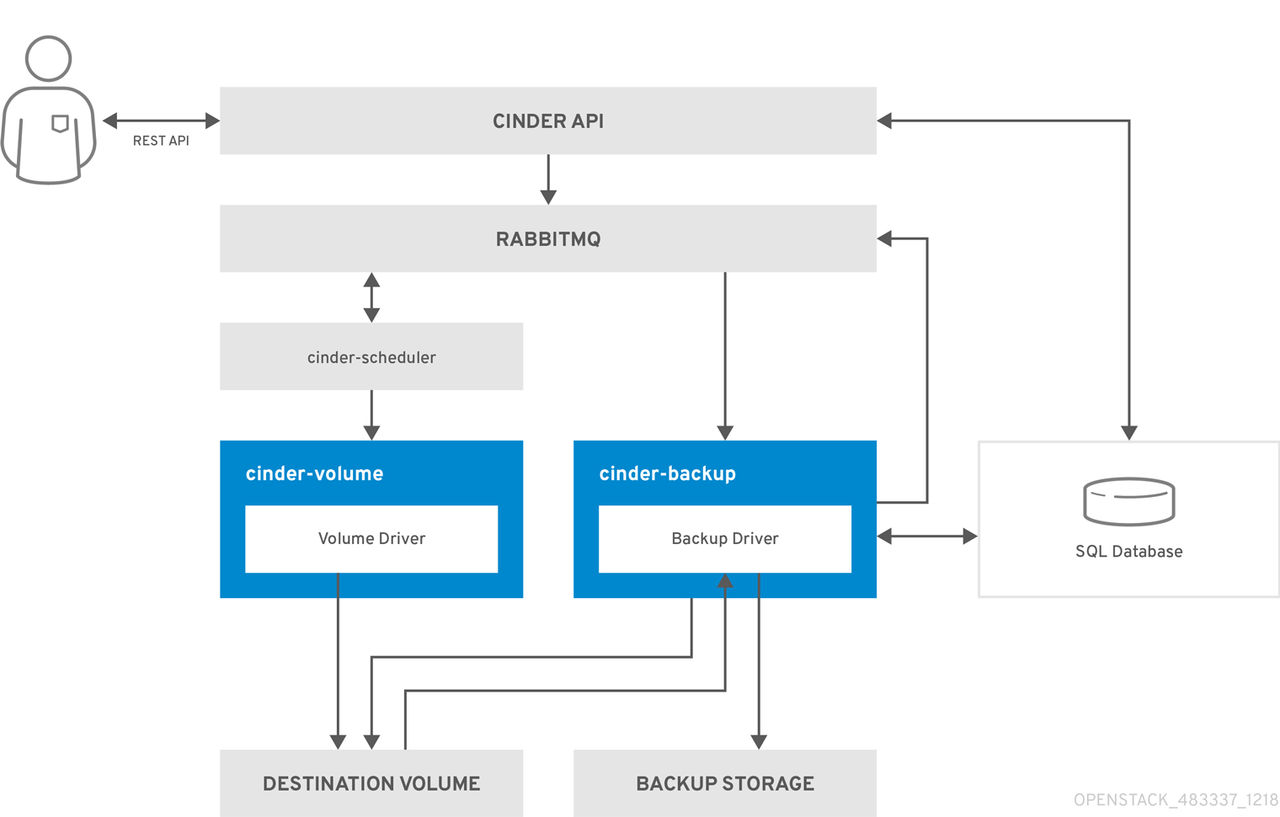
- The user issues a request to the cinder API, which is a REST API, to restore a Block Storage backup.
- The cinder API receives the request from HAProxy and validates the request, the user credentials, and other information.
- If the request does not contain an existing volume as the destination, the cinder API makes an asynchronous RPC call to create a new volume and polls the status of the volume until it becomes available.
- The
cinder-schedulerselects a volume service and makes the RPC call to create the volume. - The selected
cinder-volumeservice creates the volume. - When the cinder API detects that the volume is available, the backup record is updated in the database.
- The cinder API makes an asynchronous RPC call to the backup service via AMQP to restore the backup.
- The cinder API returns the current volume ID, backup ID, and volume name to the API caller.
- An RPC create message arrives on one of the backup services.
- The
cinder-backupservice performs a synchronous RPC call tocinder-volumeto expose the volume. - The
cinder-volumeservice exports and maps the volume returning the appropriate connection information. - The
cinder-backupservice attaches the volume by using the connection information. - The
cinder-backupservice calls the back end driver with the volume already attached, which begins the data restoration to the volume. - The volume is detached from the backup host.
- The
cinder-backupservice issues a synchronous RPC tocinder-volumeto disconnect the volume. - The
cinder-volumeservice unmaps and removes the export for the volume. - When the volume is restored, the backup record is updated in the database.

'%20d='M201.5%20305.5c-13.8%200-24.9-11.1-24.9-24.6%200-13.8%2011.1-24.9%2024.9-24.9%2013.6%200%2024.6%2011.1%2024.6%2024.9%200%2013.6-11.1%2024.6-24.6%2024.6zM504%20256c0%20137-111%20248-248%20248S8%20393%208%20256%20119%208%20256%208s248%20111%20248%20248zm-132.3-41.2c-9.4%200-17.7%203.9-23.8%2010-22.4-15.5-52.6-25.5-86.1-26.6l17.4-78.3%2055.4%2012.5c0%2013.6%2011.1%2024.6%2024.6%2024.6%2013.8%200%2024.9-11.3%2024.9-24.9s-11.1-24.9-24.9-24.9c-9.7%200-18%205.8-22.1%2013.8l-61.2-13.6c-3-.8-6.1%201.4-6.9%204.4l-19.1%2086.4c-33.2%201.4-63.1%2011.3-85.5%2026.8-6.1-6.4-14.7-10.2-24.1-10.2-34.9%200-46.3%2046.9-14.4%2062.8-1.1%205-1.7%2010.2-1.7%2015.5%200%2052.6%2059.2%2095.2%20132%2095.2%2073.1%200%20132.3-42.6%20132.3-95.2%200-5.3-.6-10.8-1.9-15.8%2031.3-16%2019.8-62.5-14.9-62.5zM302.8%20331c-18.2%2018.2-76.1%2017.9-93.6%200-2.2-2.2-6.1-2.2-8.3%200-2.5%202.5-2.5%206.4%200%208.6%2022.8%2022.8%2087.3%2022.8%20110.2%200%202.5-2.2%202.5-6.1%200-8.6-2.2-2.2-6.1-2.2-8.3%200zm7.7-75c-13.6%200-24.6%2011.1-24.6%2024.9%200%2013.6%2011.1%2024.6%2024.6%2024.6%2013.8%200%2024.9-11.1%2024.9-24.6%200-13.8-11-24.9-24.9-24.9z'/%3e%3c/svg%3e)