Troubleshoot notification failures
The notifications service event log enables Notifications administrators to see when notifications are not working properly. The event log provides a list of all triggered events on the Red Hat Hybrid Cloud Console account, and actions taken for the past 14 days.
Before you begin
- You are logged in to the Hybrid Cloud Console as a user with Notifications administrator or Organization Administrator permissions.
Note You cannot log in to the Hybrid Cloud Console with your email address unless your email address is the same as your Red Hat login. For more information, see ../get-started/access-hcc.dita#finding-login.
In the Action taken column, each event shows the notification method highlighted in green or red to indicate the status of the message transmission. The filterable event log is a useful troubleshooting tool to see a failed notification event and identify potential issues with endpoints.
After seeing a failed action in the event log, the Notifications administrator can check the endpoint and the status of the last five connection attempts on the Integrations screen.
In the integrations service, the following connection statuses are reflected by color:
- Green: Five previous transmissions were successful.
- Red: Five previous transmissions were unsuccessful (timeout, 404 error, etc).
- Yellow: Connection is degraded; at least two of the five previous transmissions were unsuccessful.
- Unknown: The integration has not yet been called, or is not associated with a behavior group.
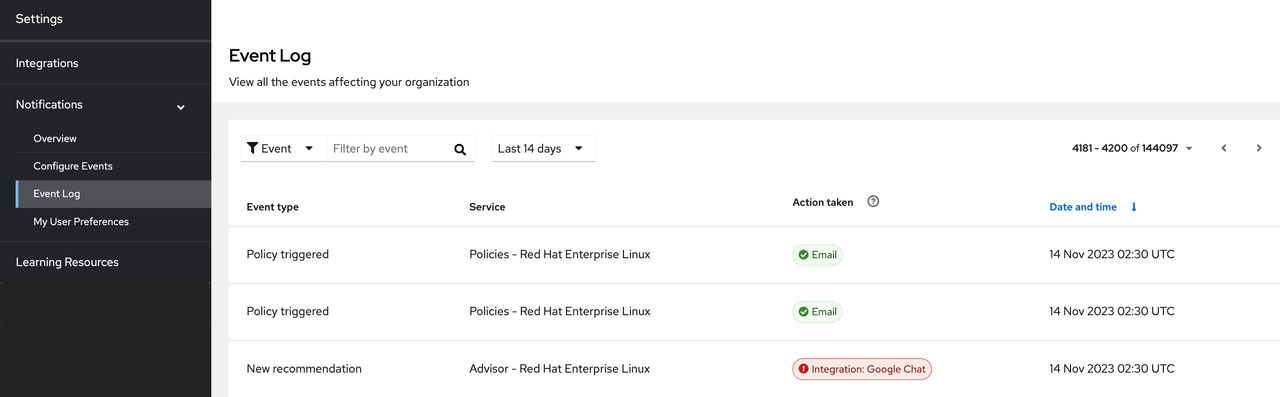
The event log can answer questions related to receipt of emails. By showing the email action for an event as green, the event log enables a Notifications administrator to confirm that emails were sent successfully.
Even when notifications and integrations are configured properly, individual users on the Hybrid Cloud Console account must configure their user preferences to receive emails.
Before users receive notifications using the webhook integration type, a Notifications administrator must configure endpoints for your organization’s preferred webhook application.

'%20d='M201.5%20305.5c-13.8%200-24.9-11.1-24.9-24.6%200-13.8%2011.1-24.9%2024.9-24.9%2013.6%200%2024.6%2011.1%2024.6%2024.9%200%2013.6-11.1%2024.6-24.6%2024.6zM504%20256c0%20137-111%20248-248%20248S8%20393%208%20256%20119%208%20256%208s248%20111%20248%20248zm-132.3-41.2c-9.4%200-17.7%203.9-23.8%2010-22.4-15.5-52.6-25.5-86.1-26.6l17.4-78.3%2055.4%2012.5c0%2013.6%2011.1%2024.6%2024.6%2024.6%2013.8%200%2024.9-11.3%2024.9-24.9s-11.1-24.9-24.9-24.9c-9.7%200-18%205.8-22.1%2013.8l-61.2-13.6c-3-.8-6.1%201.4-6.9%204.4l-19.1%2086.4c-33.2%201.4-63.1%2011.3-85.5%2026.8-6.1-6.4-14.7-10.2-24.1-10.2-34.9%200-46.3%2046.9-14.4%2062.8-1.1%205-1.7%2010.2-1.7%2015.5%200%2052.6%2059.2%2095.2%20132%2095.2%2073.1%200%20132.3-42.6%20132.3-95.2%200-5.3-.6-10.8-1.9-15.8%2031.3-16%2019.8-62.5-14.9-62.5zM302.8%20331c-18.2%2018.2-76.1%2017.9-93.6%200-2.2-2.2-6.1-2.2-8.3%200-2.5%202.5-2.5%206.4%200%208.6%2022.8%2022.8%2087.3%2022.8%20110.2%200%202.5-2.2%202.5-6.1%200-8.6-2.2-2.2-6.1-2.2-8.3%200zm7.7-75c-13.6%200-24.6%2011.1-24.6%2024.9%200%2013.6%2011.1%2024.6%2024.6%2024.6%2013.8%200%2024.9-11.1%2024.9-24.6%200-13.8-11-24.9-24.9-24.9z'/%3e%3c/svg%3e)