View details about roles and user permissions
You can view details about the roles and permissions for User Access from the roles page. You can view a user’s permissions and other access-related information from the user details page.
View roles and permissions
Copy linkLink copied!
View details about the roles and permissions for User Access in the Red Hat Hybrid Cloud Console from the Roles page.
Before you begin
Copy linkLink copied!
- You are logged in to the Red Hat Hybrid Cloud Console as a user who has Organization Administrator permission.
Note You cannot log in to the Hybrid Cloud Console with your email address unless your email address is the same as your Red Hat login. For more information, see Find your Red Hat login . - If you are not an Organization Administrator, you must be a member of a group that has the User Access administrator role assigned to it.
For a list of predefined roles provided by Red Hat, see Predefined User Access roles.
You cannot modify a predefined role.
Procedure
Copy linkLink copied!
-
In the table, click either the role Name or the role Permissions to see details about the permissions assigned to the role. For example, if you click on the Cost Price List viewer role, you see the following information:
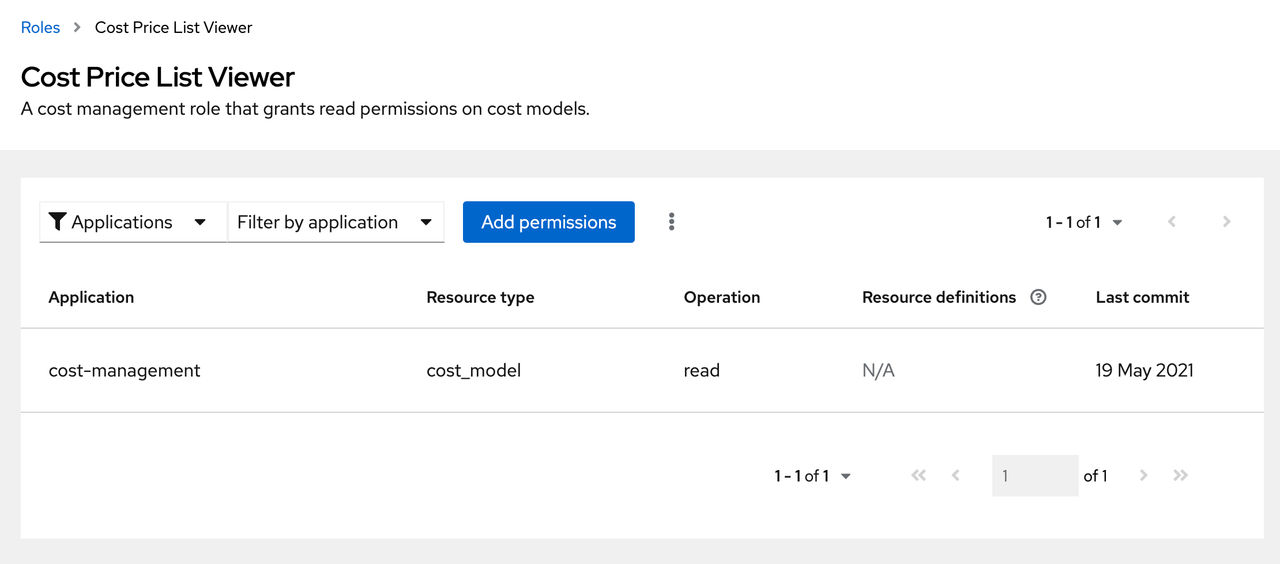
Note An asterisk * indicates a wildcard permission. A wildcard permission grants access to all resource types and allows all operations for the applications in a role.
View user permissions
Copy linkLink copied!
View a user’s permissions and other access-related information from the user details page.
Before you begin
Copy linkLink copied!
- You are logged in to the Red Hat Hybrid Cloud Console as a user who has Organization Administrator permission.
Note You cannot log in to the Hybrid Cloud Console with your email address unless your email address is the same as your Red Hat login. For more information, see Find your Red Hat login. - If you are not an Organization Administrator, you must be a member of a group that has the User Access administrator role assigned to it.
If you are not an Organization Administrator, you can view your own permissions for different services by navigating to the Red Hat Hybrid Cloud Console > Settings > Identity & Access Management > My User Access.
Procedure
Copy linkLink copied!

'%20d='M201.5%20305.5c-13.8%200-24.9-11.1-24.9-24.6%200-13.8%2011.1-24.9%2024.9-24.9%2013.6%200%2024.6%2011.1%2024.6%2024.9%200%2013.6-11.1%2024.6-24.6%2024.6zM504%20256c0%20137-111%20248-248%20248S8%20393%208%20256%20119%208%20256%208s248%20111%20248%20248zm-132.3-41.2c-9.4%200-17.7%203.9-23.8%2010-22.4-15.5-52.6-25.5-86.1-26.6l17.4-78.3%2055.4%2012.5c0%2013.6%2011.1%2024.6%2024.6%2024.6%2013.8%200%2024.9-11.3%2024.9-24.9s-11.1-24.9-24.9-24.9c-9.7%200-18%205.8-22.1%2013.8l-61.2-13.6c-3-.8-6.1%201.4-6.9%204.4l-19.1%2086.4c-33.2%201.4-63.1%2011.3-85.5%2026.8-6.1-6.4-14.7-10.2-24.1-10.2-34.9%200-46.3%2046.9-14.4%2062.8-1.1%205-1.7%2010.2-1.7%2015.5%200%2052.6%2059.2%2095.2%20132%2095.2%2073.1%200%20132.3-42.6%20132.3-95.2%200-5.3-.6-10.8-1.9-15.8%2031.3-16%2019.8-62.5-14.9-62.5zM302.8%20331c-18.2%2018.2-76.1%2017.9-93.6%200-2.2-2.2-6.1-2.2-8.3%200-2.5%202.5-2.5%206.4%200%208.6%2022.8%2022.8%2087.3%2022.8%20110.2%200%202.5-2.2%202.5-6.1%200-8.6-2.2-2.2-6.1-2.2-8.3%200zm7.7-75c-13.6%200-24.6%2011.1-24.6%2024.9%200%2013.6%2011.1%2024.6%2024.6%2024.6%2013.8%200%2024.9-11.1%2024.9-24.6%200-13.8-11-24.9-24.9-24.9z'/%3e%3c/svg%3e)