Cost Explorer overview
Cost Explorer is the primary cost management interface for viewing, filtering, and analyzing your IT expenditure across cloud and OpenShift environments by time, source, and metrics.
With Cost Explorer you can perform the following tasks:
- Identify abnormal events.
- Understand how your cost data changes over time.
- Create custom bar charts of your cost and usage data.
- Export custom cost data files.
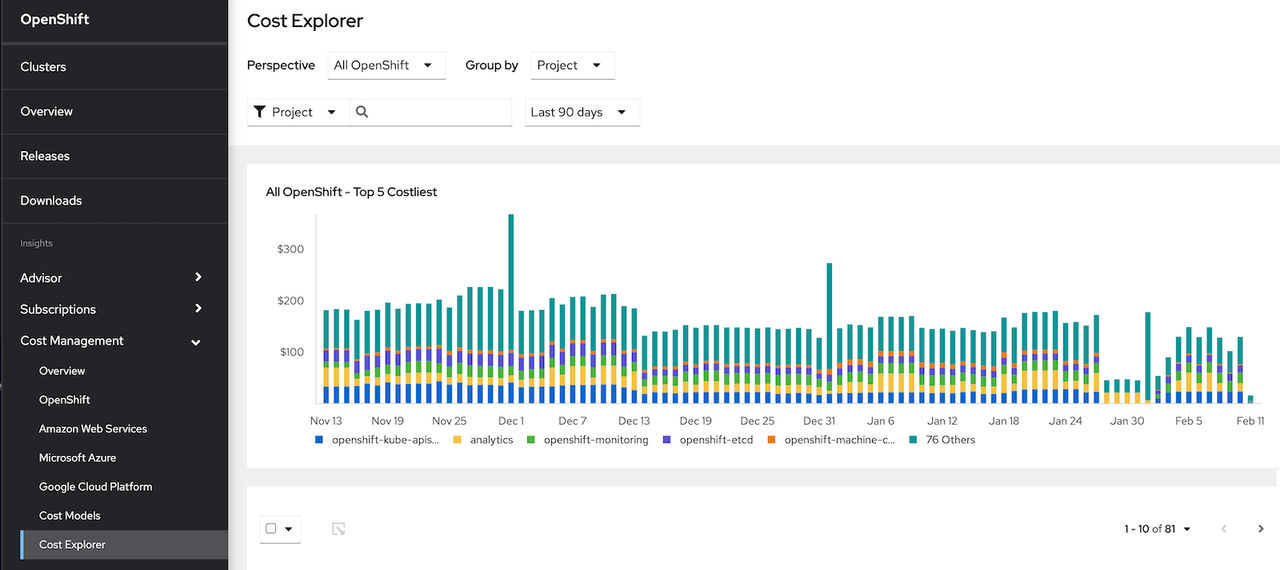
A single bar in the Cost Explorer chart represents one day of cost and usage data corresponding to the filtered options. The five most significant metrics are individually displayed and all other metrics placed into the Others category.
Cost of unallocated resources in an OpenShift cluster
Unallocated costs are visible when viewing OpenShift cost data grouped by project. Rows named Platform unallocated and Worker unallocated are available when viewing OpenShift cost data by project.
- Platform unallocated costs
- The costs for parts of primary and infrastructure nodes that are not allocated to run workloads. In this case, those workloads are the OpenShift platform or control plane.
- Worker unallocated costs
- The costs that represent any unused part of your worker node’s usage and request capacity.
- Network unattributed costs
- Costs associated with ingress and egress network traffic for individual nodes.
Unattributed Storage project for OpenShift on Cloud
Cost management is able to estimate the size of the cloud disk through the Cost Usage report. Cost management correlates the cloud disk to the Persistent Volume Claim (PVC) through the Container Storage Interface (CSI) volume handle. It identifies unattributed storage by calculating the unutilized portion of the disk in the following scenarios:
- Volumes without a claim
- A persistent volume (PV) exists, but there are no persistent volume claims (PVCs) that use the volume. Without a claim, the cloud cost cannot be associated with a node or namespace.
- Unutilized disk space
- There is disk space on the cloud disk that is not being used.
Consider the following example:
- You have a disk that has 30 GiBs.
- Project A creates a persistent volume that has a capacity of 20 GiBs.
- The cloud integration charges $60 for that disk.
Cost management uses the following equation to calculate how much to charge Project A based on disk capacity. In this example, the cost is $40:
(PV’s Capacity) / Disk Capacity * Cost of Disk
20/30 * 60 = $40
The cloud integration still bills you for the $60 dollars, but cost management can only attribute $40 to Project A based on how much Project A requested. The remaining $20 is assigned to the Unattributed Storage project. Cost management calculates the remaining portion of that disk with the following equation. In this example, the cost is $20:
((Disk Capacity - Sum(PV capacity) / Disk Capacity) * Cost of Disk
(30 - 20) / 30 * 60 = $20

'%20d='M201.5%20305.5c-13.8%200-24.9-11.1-24.9-24.6%200-13.8%2011.1-24.9%2024.9-24.9%2013.6%200%2024.6%2011.1%2024.6%2024.9%200%2013.6-11.1%2024.6-24.6%2024.6zM504%20256c0%20137-111%20248-248%20248S8%20393%208%20256%20119%208%20256%208s248%20111%20248%20248zm-132.3-41.2c-9.4%200-17.7%203.9-23.8%2010-22.4-15.5-52.6-25.5-86.1-26.6l17.4-78.3%2055.4%2012.5c0%2013.6%2011.1%2024.6%2024.6%2024.6%2013.8%200%2024.9-11.3%2024.9-24.9s-11.1-24.9-24.9-24.9c-9.7%200-18%205.8-22.1%2013.8l-61.2-13.6c-3-.8-6.1%201.4-6.9%204.4l-19.1%2086.4c-33.2%201.4-63.1%2011.3-85.5%2026.8-6.1-6.4-14.7-10.2-24.1-10.2-34.9%200-46.3%2046.9-14.4%2062.8-1.1%205-1.7%2010.2-1.7%2015.5%200%2052.6%2059.2%2095.2%20132%2095.2%2073.1%200%20132.3-42.6%20132.3-95.2%200-5.3-.6-10.8-1.9-15.8%2031.3-16%2019.8-62.5-14.9-62.5zM302.8%20331c-18.2%2018.2-76.1%2017.9-93.6%200-2.2-2.2-6.1-2.2-8.3%200-2.5%202.5-2.5%206.4%200%208.6%2022.8%2022.8%2087.3%2022.8%20110.2%200%202.5-2.2%202.5-6.1%200-8.6-2.2-2.2-6.1-2.2-8.3%200zm7.7-75c-13.6%200-24.6%2011.1-24.6%2024.9%200%2013.6%2011.1%2024.6%2024.6%2024.6%2013.8%200%2024.9-11.1%2024.9-24.6%200-13.8-11-24.9-24.9-24.9z'/%3e%3c/svg%3e)