The cost model workflow
The cost model workflow applies a price to metrics and inventory, normalizes cost data from different integrations, applies a markup or discount, and distributes the costs across relevant resources. The cost model also helps differentiate raw costs from the costs used in cost management.
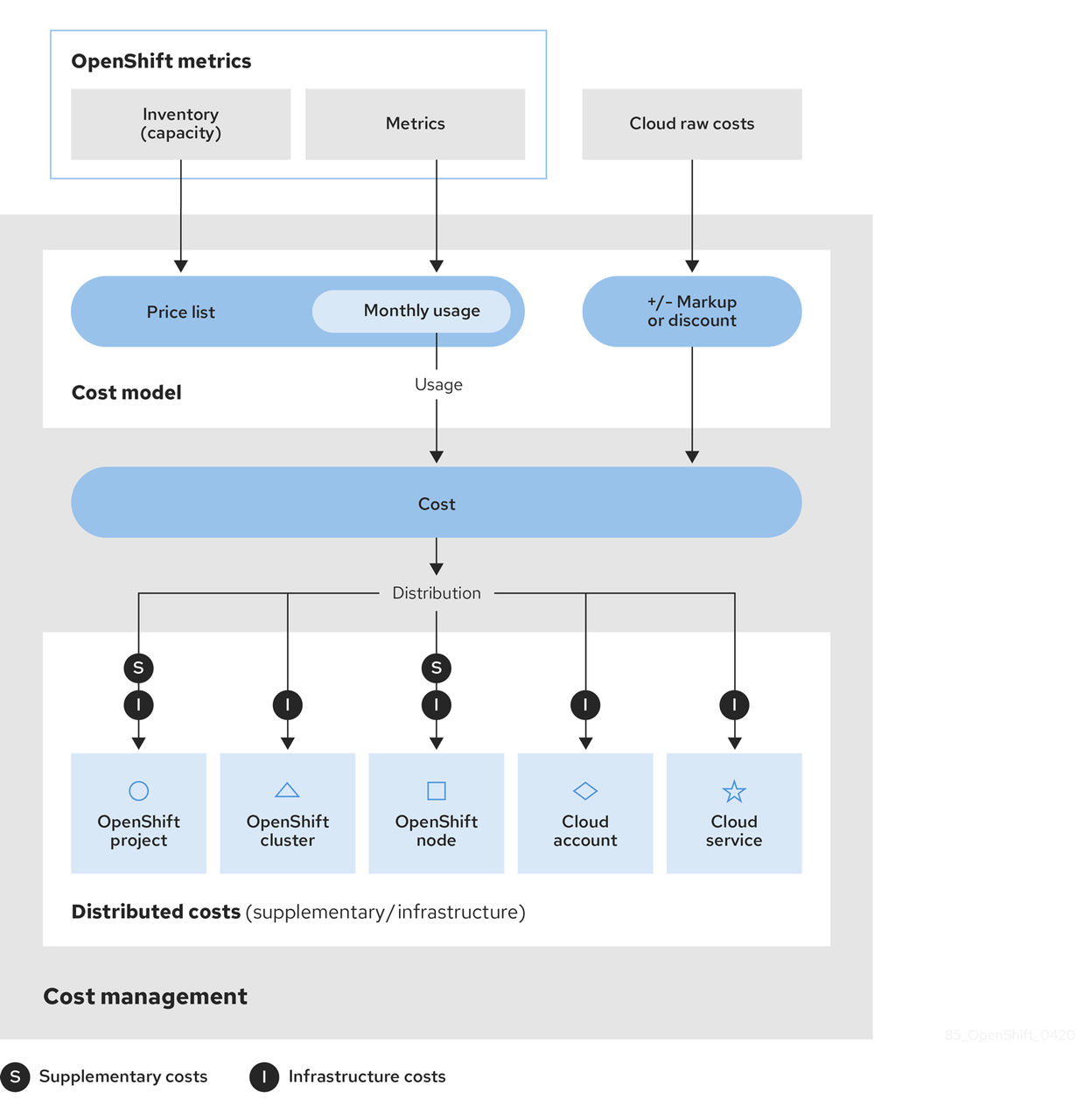
- Cost management collects cost data from several integrations:
- Inventory - All the resources that have ever run in your integration, including those that are no longer in use. For example, if your OpenShift Container Platform environment contains a node that is not in use, that node still costs $x amount per month. There are several ways to collect inventory data into cost management: cost management can generate inventory from the AWS data export, Azure or Google Cloud export, or OpenShift Metering Operator reports.
- Metrics - A subset of the OpenShift inventory showing usage and consumption for each resource.
- Cloud raw costs - AWS, Azure, and Google Cloud provide regular reports to cost management listing consumption of resources and their costs, which cost management uses for calculations. As a result, configuring a custom price list is not necessary for cloud integrations.
- The cost model allows you to apply a markup or discount of your choice to account for other costs and overhead, and provides options for assigning a cost layer (infrastructure or supplementary) to costs:
- For OpenShift Container Platform integrations - Since the metrics and inventory data do not have a price assigned to usage, you must create and assign a price list to your integrations to determine the usage cost of these resources. A price list includes rates for storage, memory, CPU usage and requests, and clusters and nodes.
- For AWS, Azure, and Google Cloud integrations - You can create cost models for these integrations to account for any extra costs or overhead in your environment by applying a markup percentage, or a negative percentage to calculate a discount.
- Costs from integrations are then collected together and allocated as infrastructure cost and supplementary cost.
- The cost is then distributed to resources across the environment. Depending on your organization, these resources may include OpenShift projects, nodes, or clusters, and cloud integration services or accounts. You can also use tagging to distribute the costs by team, project, or group within your organization.

'%20d='M201.5%20305.5c-13.8%200-24.9-11.1-24.9-24.6%200-13.8%2011.1-24.9%2024.9-24.9%2013.6%200%2024.6%2011.1%2024.6%2024.9%200%2013.6-11.1%2024.6-24.6%2024.6zM504%20256c0%20137-111%20248-248%20248S8%20393%208%20256%20119%208%20256%208s248%20111%20248%20248zm-132.3-41.2c-9.4%200-17.7%203.9-23.8%2010-22.4-15.5-52.6-25.5-86.1-26.6l17.4-78.3%2055.4%2012.5c0%2013.6%2011.1%2024.6%2024.6%2024.6%2013.8%200%2024.9-11.3%2024.9-24.9s-11.1-24.9-24.9-24.9c-9.7%200-18%205.8-22.1%2013.8l-61.2-13.6c-3-.8-6.1%201.4-6.9%204.4l-19.1%2086.4c-33.2%201.4-63.1%2011.3-85.5%2026.8-6.1-6.4-14.7-10.2-24.1-10.2-34.9%200-46.3%2046.9-14.4%2062.8-1.1%205-1.7%2010.2-1.7%2015.5%200%2052.6%2059.2%2095.2%20132%2095.2%2073.1%200%20132.3-42.6%20132.3-95.2%200-5.3-.6-10.8-1.9-15.8%2031.3-16%2019.8-62.5-14.9-62.5zM302.8%20331c-18.2%2018.2-76.1%2017.9-93.6%200-2.2-2.2-6.1-2.2-8.3%200-2.5%202.5-2.5%206.4%200%208.6%2022.8%2022.8%2087.3%2022.8%20110.2%200%202.5-2.2%202.5-6.1%200-8.6-2.2-2.2-6.1-2.2-8.3%200zm7.7-75c-13.6%200-24.6%2011.1-24.6%2024.9%200%2013.6%2011.1%2024.6%2024.6%2024.6%2013.8%200%2024.9-11.1%2024.9-24.6%200-13.8-11-24.9-24.9-24.9z'/%3e%3c/svg%3e)